


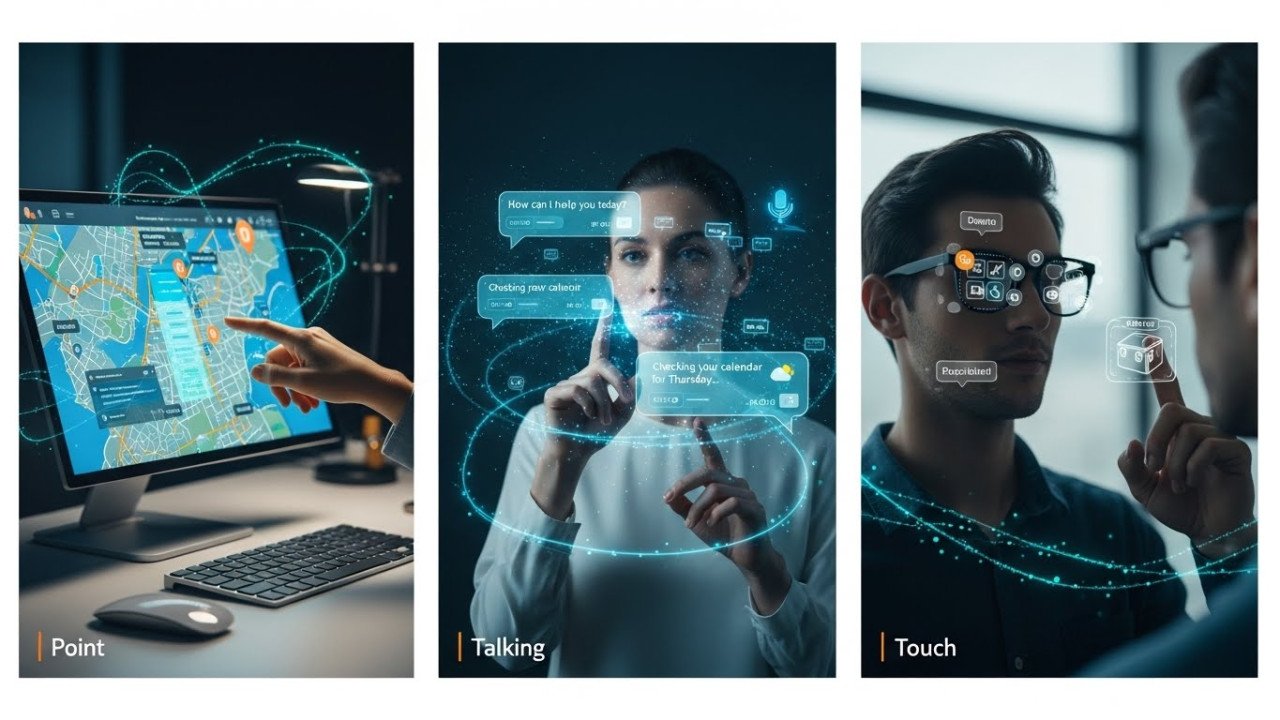
Conversational AI Interfaces: Designing Multimodal Experiences With Voice, Vision, and Gesture
The Shift From Single-Mode to Multimodal: Why Humans Don't Interact Linearly
Humans communicate simultaneously through multiple channels: we speak, gesture, adjust tone, and read visual context. Traditional conversational AI handles one channel at a time—voice bots process speech, text bots process text, and visual systems process images independently. This isolation creates friction. Users switch between interfaces instead of interacting naturally. By 2025, production systems will combine these modalities, processing voice while analyzing facial expressions and hand gestures, and responding through both speech and visual guidance simultaneously. The result: interactions that feel collaborative rather than transactional.
Real-world adoption accelerated from 2024 to 2025. ChatGPT's multimodal update (2025) enabled voice, vision, and text in a single interface. Microsoft Copilot integrated voice analysis with slide interpretation. Zoom transcribes meetings while analyzing speaker tone and sentiment. These deployments prove multimodal interfaces aren't science fiction—they're now production standard for customer support, healthcare, field service, and retail. The question shifted from "Should we build this?" to "How do we build this fast enough? How do we keep latency tolerable? How do we avoid deploying obviously broken systems?"
The Three Modalities: Architecture and Real-World Challenges
Speech Recognition: The Latency Foundation
Voice input seems simple: speak, listen, respond. Real deployment is complex. Speech-to-text (STT) accuracy advertised at 95%+ degrades rapidly in production. Claimed "5% error rates" don't reflect field reality. Background noise, technical jargon, multiple speakers, and domain-specific terminology drive real-world accuracy down to 10-25% word error rate (WER) in noisy environments.
PolyAI's Owl model achieves 12.2% WER on customer service calls—exceptional performance because it was trained on actual call-center audio with varied accents and phone-line quality. Off-the-shelf models trained on clean YouTube audio struggle on actual customer interactions: background traffic noise, retail store noise, field service environments where workers are in factories or construction sites.
The Latency Bottleneck
For speech interaction to feel natural, response latency must stay under 300 milliseconds. This is the new benchmark. Natural human conversation involves 200-500ms pauses—the time we take to think and formulate responses. Latency exceeding 300ms feels sluggish. Latency exceeding 1 second feels broken—users assume the system hung.
Current pipeline latency breaks down as:
Speech-to-text conversion: 300-800ms (depends on audio quality and model). Language model reasoning: 500-1,500ms (depends on response complexity and model size). Text-to-speech synthesis: 300-1,000ms (depends on audio quality target). Network round-trip: 50-200ms (if using cloud APIs).
Total: 1.15-3.5 seconds from the user finishing speaking to the AI beginning response. This explains why most voice assistants feel awkward—they violate the latency constraint by orders of magnitude.
Emerging Real-Time LLMs Change Everything
OpenAI's Realtime LLM (2025) and Google's similar models process audio directly without intermediate text conversion. The pipeline collapses from 6 steps to essentially 1: Audio → Reasoning → Audio. Latency drops from seconds to hundreds of milliseconds—well within the 300ms natural conversation window. These models can listen and speak simultaneously, enabling overlapping speech and natural turn-taking. The architectural shift is profound: systems that feel responsive instead of sluggish, that feel like conversations instead of question-answer sequences.
Vision and Gesture: Context and Intent
Adding visual input transforms conversations from text-only to contextual. A customer uploads a photo of a damaged product while describing it verbally. The system analyzes the image, confirms understanding through speech, and routes to the right resolution path—all in one interaction. Field service technicians stream video of the equipment while an AI system interprets the problem and provides voice-guided instructions. Gesture recognition detects when users point, wave, or make specific hand movements, enabling touchless interaction in healthcare, factory floors, or when hands are occupied.
Real-world gesture recognition achieves 85-95% accuracy on trained sets. False positive rates remain problematic—unintended gestures triggering actions accidentally. Production deployments use "garbage classes" (training the system to recognize and ignore everyday movements that resemble intentional gestures) to reduce false positives from 15-20 per hour to 2-3 per hour. The improvement is material—users tolerate occasional misunderstandings but get frustrated by constant accidental triggers.
Design Patterns for Multimodal Interfaces
Pattern 1: Modality Fallback and Escalation
Not all users can interact through all modalities. Build systems where users can switch: start with voice, fall back to text when noise is too high, escalate to video when explanation requires visual demonstration. Design with accessibility in mind from the start—screen readers for vision-impaired, captions for hearing-impaired, text fallback when audio fails.
An airline customer support bot handles typical queries through voice. When noise makes speech recognition fail (in airport environments), the system offers text chat. When the query becomes complex (rebooking after cancellation), video call options emerge. Each escalation path is designed, not improvised, after the oice fails.
Pattern 2: Parallel Processing Without Sequential Bottlenecks
Traditional pipelines process sequentially: finish listening, start reasoning, finish reasoning, start speaking. Modern architectures process in parallel: listen while reasoning, reason while speaking, and interrupt and adjust based on new input. This parallelization is what Realtime LLMs enable natively—simultaneous audio input and output over WebRTC streams.
If parallelization isn't available (older systems), fake it through streaming: start reasoning on partial speech (after the first few words), stream text-to-speech output incrementally so users hear responses beginning before full generation completes. Streaming reduces perceived latency by 30-40% even though actual latency is identical.
Pattern 3: Cross-Modal Confirmation
When systems misunderstand, recovery is cheaper through cross-modal confirmation. If speech-to-text produces uncertain results, ask for confirmation visually: "Did you say [text displayed]? Say yes/no or point to the correct option." If gesture recognition is uncertain, confirm through voice: "I detected a wave. Did you mean to dismiss this?" Cross-modal checks prevent the accumulation of errors across modalities.
Pattern 4: Modality-Specific Success Metrics
What counts as success varies by modality and use case. For customer support voice agents: success = issue resolved within 2 minutes. For gesture-based accessibility interfaces: success = user completes task without frustrated escalations. For healthcare documentation: success = clinician voice-dictated note is accurate enough for billing and treatment without human correction. Design with these definitions from day one, not retrofitted after deployment.
Production Challenges: The Gap Between Demo and Reality
The Accuracy Myth
Marketing claims "95% accuracy in speech recognition." Production reality in noisy environments: 75-85% accuracy at best. Why? Demo accuracy is measured on clean, controlled audio. Production accuracy is measured across diverse speakers, accents, technical jargon, and environmental noise. A field service technician in a manufacturing facility faces background machinery noise. A retail support agent handles overlapping customer conversations. A healthcare provider dictates notes in a clinic with interruptions.
Domain-specific fine-tuning helps: training on actual call-center audio, actual field service recordings, and actual clinical dictation. PolyAI's results prove this—by training on real customer service audio, they achieved 12.2% WER versus an industry baseline of 20-30% WER. The improvement doesn't come from better models. It comes from training data that reflects actual deployment conditions.
The Endpointing Deadlock
Humans pause when thinking. When does the system know you've finished speaking? Too aggressive (respond after 0.5 seconds of silence), and you interrupt users mid-thought. Too conservative (wait 2+ seconds), and the system feels slow. Field testing revealed this is harder than it sounds. A user pauses for 1.5 seconds while reading a product model number. The system thinks they've finished and responds. Now both are talking.
Production systems use segmentation: detect natural sentence boundaries, respond to complete thoughts, and use visual feedback (spinning indicator) during pauses to signal that the system is listening. Some systems let users explicitly signal completion ("that's it" or a gesture) to remove ambiguity.
Redundancy Is Non-Negotiable
Traditional applications have graceful degradation. Voice systems have hard failures—when speech-to-text stops working, the entire system stops. Production deployments require multiple STT providers with automatic failover. Multiple LLM providers for response generation. Fallback systems that switch to text or escalate to a human when primary systems fail.
Field service organizations learned this hard: deployment of a single voice agent without redundancy meant that when the speech provider had an outage (rare but not zero), the entire field workforce lost support for hours. Second deployment added failover. Now, primary provider outage triggers an automatic switch to backup in seconds; users barely notice.
Cold Start and Personalization Lag
When a customer calls, the system knows nothing about them initially. The first interaction lacks context: previous issues, preferences, and account details. Systems that fetch context during the call experience latency spikes. Design for progressive disclosure: immediate basic support without context, then seamlessly enhance as backend systems fetch history. Visual interfaces can display context during speech interactions, improving user confidence that the system understands their situation.
Real-World Implementation: Customer Support Case Study
An enterprise deployed multimodal customer support handling billing inquiries, service issues, and order tracking. Voice-first interface defaults for accessibility. If speech recognition confidence falls below 80%, the system offers text fallback. Complex issues involve photo upload (damaged shipments, wrong items) plus description—vision and voice combined. Success metric: issue resolved without human escalation in under 2 minutes.
Initial deployment achieved 68% automation (no human required). After optimization:
Week 1-2: Deployed with a general speech model. Real accuracy 72% WER. Misunderstandings drove a 45% escalation rate. Week 3-4: Fine-tuned on actual customer call recordings. Accuracy improved to 8.5% WER. Escalation rate dropped to 18%. Week 5-6: Added gesture recognition for menu navigation on video calls. Mobile app integration reduced voice-only calls by 22%. Week 7-8: Cross-modal confirmation (visual confirmation of voice understanding) reduced recovery steps by 30%. Final automation rate: 81% (no human required).
Cost structure: $45,000 initial development, $15,000 fine-tuning on real data, $8,000/month ongoing operations. Annual ROI: $2.2M (labor savings) - $130K (costs) = $2.07M. Payback period: 2.8 months.
Design Best Practices That Work
Start Vertical-Specific, Not Horizontal
Successful voice agents are purpose-built for specific workflows, not general-purpose assistants. A healthcare scheduling bot optimizes for appointment details. A field service agent optimizes for equipment diagnostics. They don't try to do everything. Horizontal platforms attempting to serve all use cases struggle to meet the specific requirements of any. Vertical depth beats horizontal breadth.
Measure What Matters, Not What's Easy
Latency, accuracy, and resolution rates are measurable. But what matters to users is task completion and frustration. Design evaluation frameworks combining quantitative metrics (latency, WER) with qualitative outcomes (task success, user satisfaction). A perfectly accurate system that takes 45 seconds to resolve a query might score higher on latency and accuracy but lose on overall satisfaction compared to a faster, slightly less accurate system that completes tasks in 60 seconds.
Design for Actual User Behavior, Not Expected Behavior
Field testing revealed that 80% of field service agent interactions were yes/no responses—not the conversational flows designers expected. Users want efficiency, not chat. Design for the actual use case: quick confirmations, brief explanations, direct answers. Natural language fluency ranks lower than task completion speed in user priorities.
Progressive Enhancement Over Perfection
Don't wait to deploy until the system is perfect. Deploy with intentional limitations (voice-only for simple queries, human escalation for complex issues), then expand incrementally as confidence and accuracy improve. Each deployment iteration provides real data that simulation-based testing can't capture.
Key Takeaways
- Multimodal Interfaces Are Now Production Standard: Voice, vision, and gesture combined unlock natural interactions impossible through any single modality. 2025 deployments prove feasibility and ROI.
- Latency <300ms is the Requirement, not the Goal: Response latency exceeding 300ms (from user finishing speech to AI beginning response) feels sluggish. Achieving this requires architecture that processes in parallel, not sequentially.
- Claimed Accuracy Degrades 30-50% in Production: Lab-tested "95% accuracy" becomes 70-85% accuracy in real environments due to noise, accents, and domain jargon. Fine-tuning on actual deployment audio is mandatory, not optional.
- Realtime LLMs (Audio Direct Processing) Are the Game-Changer: OpenAI and Google's realtime models process audio directly, eliminating STT and TTS intermediate steps. Latency drops from seconds to hundreds of milliseconds, enabling truly natural conversation.
- Gesture Recognition Requires Garbage Class Training: Reducing false positives from 15-20/hour to 2-3/hour requires training on everyday movements that shouldn't trigger actions. MAGIC method correlates well with production false-positive rates.
- Redundancy isn't Optional: Multiple STT providers with failover, multiple LLM providers for response generation, text fallback—production systems must handle individual component failure gracefully.
- Vertical-Specific Agents Beat Horizontal Platforms: Purpose-built for specific workflows (healthcare scheduling, field service diagnostics) outperform general-purpose systems. Depth beats breadth.
- Successful Deployments Measure Task Completion, Not Just Technology Metrics: Systems optimized for latency and accuracy alone sometimes lose out on user satisfaction. Combine quantitative metrics with qualitative outcomes from real-world testing.
The Verdict: Multimodal Conversational AI Has Moved From Innovation to Execution
The architectural pieces—Realtime LLMs, fine-tuned speech models, gesture recognition, vision integration—are proven and available. Success in 2025-2026 belongs to organizations that deploy pragmatically: starting vertical-specific, measuring actual outcomes, handling failures gracefully, and iterating on real-world data. Those chasing perfect general-purpose systems will watch competitors ship vertical solutions, capture market share, and build competitive moats through operational refinement. The technology maturity has shifted the competitive advantage from "can we build this?" to "how fast can we build it for our specific use case?"
Related Articles
- AI Search vs Traditional SEO: The Skills You Need to Master in 2025
- Real-World AI ROI: Case Studies Showing 300–650% Returns Across Industries (With Exact Metrics
- Practical AI Applications Beyond ChatGPT: How Enterprises Actually Use Generative AI to Drive Revenue
- AI Hallucinations Explained: Why AI Confidently Generates False Information (And How to Fix It)
- E-E-A-T Signals in AI Content: How Google Quality Raters Actually Evaluate AI-Generated Pages
- Vector Databases and Semantic Search: The Infrastructure Powering Next-Generation AI Applications



Comments (0)
No comments found