


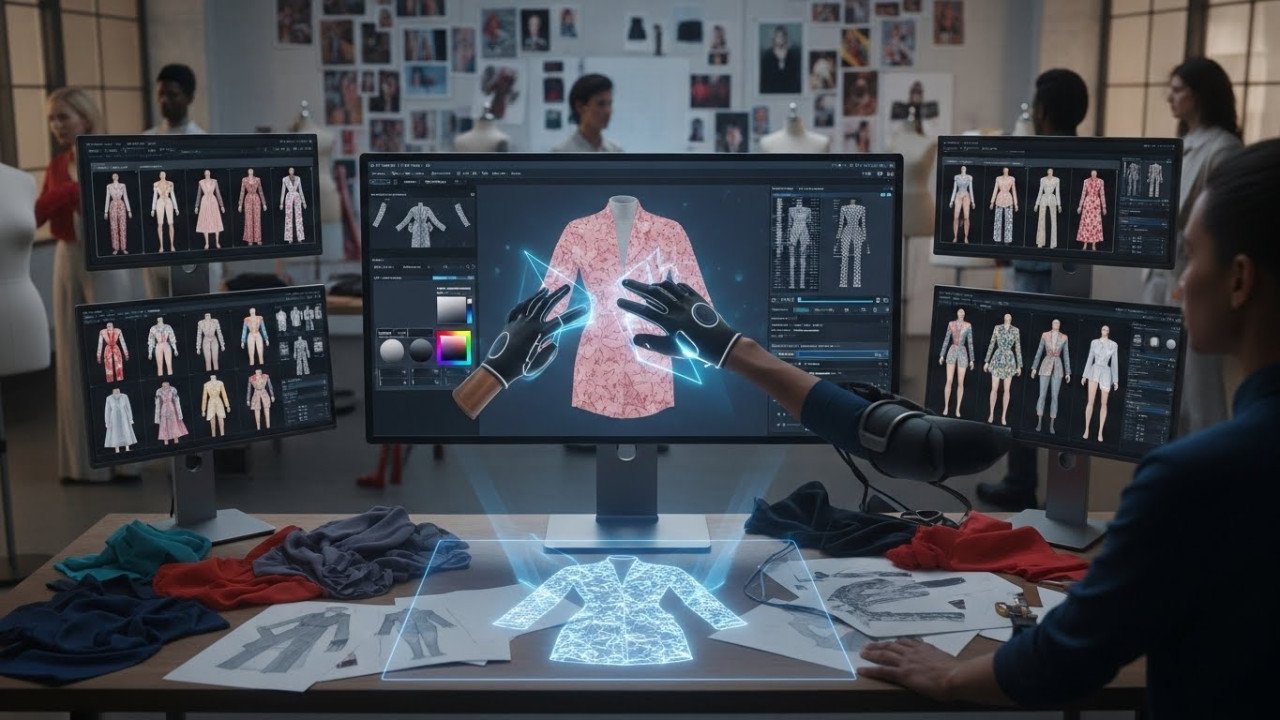
Fashion Design with AI: Creating Mockups, Prototypes, and Design Variations at Scale
Traditional fashion design workflow: sketch → sample production → fit testing → revisions. Weeks of iteration, thousands in production costs per design.
AI-accelerated workflow: concept → AI mockup variations → client feedback → refined AI prototypes → physical samples (only for finalists). Timeline: days instead of weeks. Cost: 95% reduction in prototype expenses.
By 2026, leading fashion houses will integrate AI into design pipelines. This guide reveals workflows, tools, and implementation strategies that maintain design integrity while dramatically accelerating iteration.
Fashion Design Workflow: Traditional vs AI-Enhanced
Traditional Workflow (6-12 weeks, $15,000-50,000 per design)
- Week 1-2: Sketches, mood boards, fabric sourcing
- Week 3-4: Pattern development, grading
- Week 5-6: Sample production (factory turnaround)
- Week 7-8: Fit testing, revision notes
- Week 9-10: Revisions, new samples
- Week 11-12: Final approval, production setup
Cost breakdown: Pattern development $500-1,000, sample production $3,000-10,000, fit models/testing $1,000-2,000, revisions $2,000-5,000, shipping/logistics $1,000-2,000.
AI-Enhanced Workflow (2-4 weeks, $500-2,000 per design)
- Day 1-2: Sketches, mood boards, fabric research, AI brief creation
- Day 3-5: AI mockup generation (50+ variations), design review, refinement
- Day 6-10: AI prototype iterations based on feedback, color/fabric testing
- Day 11-14: Final AI approval, physical sample production (only finalists)
Cost breakdown: AI tool subscription $30-100, mockup generation $10-50, prototype iterations $20-100, final physical samples (reduced quantity) $1,000-2,000.
Savings: $13,000-48,000 per design (90-95% reduction)
AI Tools for Fashion Design
Tool #1: DALL-E 3 (OpenAI)
Best for: Rapid concept mockups, design exploration, color/fabric variations
Strengths: Excellent text understanding, can render logos/text on garments, strong color control, natural light integration
Limitations: Stylised output (not photorealistic), hand positioning sometimes awkward, fit details less precise
Fashion workflow fit: Perfect for early concept phase (weeks 1-2), design direction exploration
Cost: $20/month (ChatGPT Plus) or $0.04/image (API)
Tool #2: Flux (Black Forest Labs)
Best for: Photorealistic prototypes, fit visualization, detailed fabric rendering
Strengths: Photorealistic quality, excellent fabric texture rendering, proportional accuracy, lighting control
Limitations: Text rendering is weaker than DALL-E 3; the model is still developing for fashion specifics
Fashion workflow fit: Perfect for prototype phase (weeks 2-3), fit visualization, fabric appearance testing
Cost: $0.06-0.10 per image (API)
Tool #3: Stable Diffusion (Custom Fine-Tuned)
Best for: Brand-specific design generation, style consistency, long-term cost efficiency
Strengths: Customisable (fine-tune on brand styles), cost-effective at scale, full control, open-source
Limitations: Requires technical setup, lower baseline quality than Flux/DALL-E 3, and a consistency variable
Fashion workflow fit: Best for established brands generating hundreds of designs annually (amortises setup cost)
Cost: Free (self-hosted) or $0.01-0.03 per image (API)
Fashion Design Workflow Implementation
Phase 1: Design Brief and AI Preparation (Day 1-2)
Create a comprehensive design brief for AI:
- Garment type: "women's cropped blazer, tailored fit, oversized lapel.s"
- Fabric/material: "burgundy wool blend, matte finish, medium weight.ht"
- Details: "metal button closures, patch pockets, internal lining visi.ble"
- Style reference: "contemporary minimalism with 90s tailoring inspiration."
- Fit context: "worn by y professional woman, office setting, fit showing garment drape."
- Color variations needed: "burgundy, navy, cream, charcoal.l"
Mood board creation: Collect 8-10 reference images showing:
- Similar garment styles (silhouette reference)
- Fabric textures and finishes
- Color palettes
- Fit/drape examples
- Styling context
Phase 2: AI Mockup Generation (Day 3-5)
Generate design variations using the master prompt template:
[GARMENT_DESCRIPTION] in [COLOR], [MATERIAL_DESCRIPTION], [STYLE_REFERENCE], worn by [MODEL_CONTEXT], professional fashion photography, studio lighting, [SPECIFIC_DETAILS], avoid: wrinkles, poor fit, amateur photography
Example-filled prompt:
Women's cropped tailored blazer in burgundy wool blend with matte finish, contemporary minimalism with 90s tailoring inspiration, metal button closures, patch pockets, internal lining visible, worn by a professional woman in an office setting, professional fashion photography, studio lighting, clean background, sharp focus on garment details, avoid: wrinkles, poor fit, amateur photography, distorted buttons
Generation strategy:
- Generate 5 base variations (different angles/poses)
- Generate 4 color variations (burgundy, navy, cream, charcoal)
- Total: 20 mockups per design concept (1-2 hours)
- Cost: $0.80-2.00 per design (using Flux or DALL-E 3 API)
Designer review: Evaluate mockups against the brief:
- ✓ Silhouette matches intent?
- ✓ Fit/drape realistic?
- ✓ Fabric appearance accurate?
- ✓ Details rendered correctly?
- ✓ Color true to specification?
Select 3-5 strongest variations for refinement.
Phase 3: Design Refinement (Day 6-10)
Iterate on selected designs:
Round 1 refinements:
- Adjust fit (if too loose/tight, modify prompt: "tailored fit, no excess fabric at waist")
- Refine proportions (adjust garment length, sleeve width specifications)
- Detail emphasis (enhance button visibility, pocket placement, seaming)
- Fabric texture (adjust matte/sheen balance in prompt)
Prompt adjustment example:
Original: "cropped blazer in burgundy wool" Refined: "cropped blazer in burgundy wool, CRITICAL: slim fit through waist with no excess fabric, cropped length hitting exactly at natural waist, sharp tailored lines, metal buttons clearly visible."
Round 2 refinements (based on feedback):
- Client/team feedback integration: "Make sleeves slightly longer" → "blazer with 3/4 length sleeves.s"
- Styling variations: Generate the same design with different models, settings, and styling
- Lifestyle context: "worn with high-waisted trousers" → generate styled outfit variations
Iterative cost: $1.00-3.00 per design (generating 10-15 refinement variations)
Phase 4: Final Approval and Physical Production (Day 11-14)
Approve final AI design:
- Final mockup review with the full team
- Color, fit, and detail sign-off
- Document approved design specifications
Production hand-off:
- Create pattern from approved AI mockup (designer translates to technical specs)
- Produce limited physical samples (1-2 units for final fit testing, not 5-10 like traditional)
- Final fit test and adjustment
- Production release
Timeline advantage: Physical sampling happens AFTER AI approval, not during design development. Reduces sampling cycle by 80%.
Advanced Techniques
Technique #1: Design Variation Matrix
Generate systematic variations across multiple design dimensions:
- Garment color: Generate in 6-8 colorways simultaneously
- Fit variations: Generate the same design in fitted, relaxed, and oversized silhouettes
- Detail options: Generate with/without pockets, different button styles, and collar variations
- Length variations: Generated in multiple lengths (cropped, standard, extended)
Example: Blazer design matrix
- Colors: 6 variations (burgundy, navy, cream, charcoal, black, tan)
- Fits: 3 variations (tailored, relaxed, oversized)
- Details: 2 variants (with/without pocket flaps)
- Total variations: 36 mockups (2-3 hours generation time, $1.50-3.00 cost)
Benefit: Sclients have a comprehensive range of options instantly. Identify winning combinations through real-time feedback instead of months of iteration.
Technique #2: Fabric Texture Simulation
Use specific textile language in prompts to simulate fabric appearance:
- Silk: "lustrous silk charmeuse with subtle sheen, fluid drape, light reflection visible."
- Cotton: "natural cotton with fine weave texture, matte finish, structured drapery.e"
- Wool: "dense wool blend with subtle grain texture, matte surface, clean lines."
- Linen: "natural linen with visible texture, slightly irregular surface, relaxed drape."
- Leather: "supple leather with natural grain, subtle sheen, structured form."
Impact: AI mockups now accurately preview actual fabric appearance vs generic "fabric look". Designers make better material decisions pre-sampling.
Technique #3: Fit Visualization with References
Use reference model images to maintain consistent proportions and fit across variations:
Process:
- Select reference image showing desired fit profile
- Include with AI brief: "Generate similar to [reference: model in fitted blazer], but in [new fabric/col. or]"
- Model proportions and fit stay consistent across variations
Benefit: 80%+ consistency in fit across color/design variations. Designer time spent on creative decisions vs consistency management.
Real-World Implementation: Indie Fashion Brand
Case Study: Emerging Women's Fashion Label
Challenge: Design and produce 40 unique pieces for a seasonal collection. Traditional approach: 40 designs × $20,000/design = $800,000 budget. Timeline: 5-6 months.
AI-Enhanced Solution:
Infrastructure setup (one-time, $500):
- DALL-E 3 ChatGPT Plus subscription: $20/month
- Flux API setup and testing: $100 initial
- Design template development: $300 (designer time)
Per-design workflow (2 weeks total):
- Day 1-2: Brief creation and AI preparation
- Day 3-5: 30 mockup generation ($0.60-1.50), designer review, selection
- Day 6-10: Refinement iterations (30 variations, $0.60-1.50), feedback integration
- Day 11-14: Physical sample production ($800-1,500), fit testing
Per-design cost: $1.50-3.00 (AI) + $800-1,500 (sampling) = $800-1,500
40-design collection cost: $32,000-60,000 (vs $800,000 traditional)
Timeline: 10 weeks (vs 24 weeks traditional)
Results:
- Design quality improved (more iterations explored)
- Cost reduction: 92%
- Timeline reduction: 58%
- Physical samples reduced from 200 to 40 (sampling cost down 80%)
Quality Assurance in AI-Generated Designs
QA Checklist for Design Approval
- ☑ Garment silhouette matches the brief specification
- ☑ Fit proportions realistic (not too loose, not too tight)
- ☑ Fabric appearance consistent with material description
- ☑ Colors accurate to specification (not oversaturated/desaturated)
- ☑ Details rendered (buttons, seams, pockets visible and correct)
- ☑ Proportions match intended size (no distortion)
- ☑ Styling context appropriate (model, setting, accessories)
- ☑ Professional photography quality (lighting, focus, composition)
Passing score: 7-8/8 criteria met. Below 6: regenerate with refined prompt.
Common Challenges and Solutions
Challenge #1: Garment Fit Inconsistency
Problem: Same design generates with varying fit across generations (sometimes tight, sometimes loose)
Solution: Use fit reference images. "Generate similar to [reference model image showing desired fit]" dramatically improves consistency.
Challenge #2: Fabric Realism
Problem: Generated fabric looks generic, not like actual material
Solution: Specify textile properties in detail. "Dense wool with subtle grain, matte finish" vs generic "wool fabric".
Challenge #3: Detail Accuracy
Problem: Buttons, seams, and fine details are not rendered correctly
Solution: Emphasize details in the prompt. "CRITICAL: metal buttons clearly visible, precise stitching detail, clean seams with no distortion".
Challenge #4: Color Matching
Problem: AI color doesn't match the specification (Pantone reference)
Solution: Include a color reference in the brief. "Exact burgundy shade matching Pantone 19-1545 (Burnt Henna)" is more accurate than descriptive color names.
FAQs
Q1: Can AI Replace Designers?
A: No. AI accelerates iteration and mockup generation, but design direction, brand intent, and creative vision remain human. AI is a tool that makes designers more productive.
Q2: How Photorealistic Are AI Fashion Mockups?
A: Current (2026) state: 85-90% photorealistic. Sufficient for design approval and client feedback. Still requires physical sampling for final production.
Q3: Can AI Handle Complex Details (Embroidery, Beading)?
A: Partially. Simple details (buttons, pockets, seams) render well. Complex 3D embroidery/beading is less accurate. For intricate details, use AI for a base mockup, then a physical sample.
Q4: What's the Learning Curve?
A: Designers proficient within 1-2 weeks. Key: learning to write effective fashion prompts (similar to learning software, and integrating AI into the workflow.
Q5: How Much Can Design Cycles Accelerate?
A: Typical: 60% timeline reduction. 6-month traditional cycle → 2.5-3 month AI-enhanced cycle. More with experience.
Q6: Does AI Work for All Fashion Categories?
A: Yes, but accuracy varies. Structured garments (blazers, shirts, pants) render better than heavily draped (evening gowns). Simple details are better than complex embellishment.
Q7: Can Small Brands Afford This?
A: Yes. Tool cost ($20-30/month) is negligible. The biggest savings come from reduced sampling (the biggest expense). ROI evident within 2-3 designs.
Related Articles for ImageCreatAI
- AI Photography Revolution 2026: Strategic Adaptation & Market Survival Guide
- AI Image Generation Mastery 2025: Expert Strategies for Studio-Quality Results
- AI Image Generation for Designers 2026: Strategic Implementation & Competitive Advantage
- DALL-E 3 vs Midjourney vs Flux Tested: Which AI Generator Actually Delivers for Marketing Teams
- Copyright and Legal Risks in AI Image Generation: What Businesses Need to Know Before Using AI Art
- Image Generation for Ecommerce: Complete Workflow From Product Photos to Scale (With Real ROI Data)
- Prompt Engineering Mastery: How Professional Designers Get Photorealistic AI Images Consistently
- Building AI Image Templates That Maintain Brand Consistency: A Professional Production Framework
- Ethical AI Image Generation: How to Create Responsibly While Mitigating Legal and Reputational Risks
Final Verdict
AI transforms fashion design from months-long iteration cycles to week-long rapid prototyping.D Designers explore more variations, make better becomeethe cisidecisionster, and reduce physical sampling costs by 80%+.
Implementation straightforward: integrate AI into the early design phase (weeks 1-2), use for mockup generation and refinement (weeks 3-5), reserve physical sampling for finalists (week 6+).
Timeline reduction: 60% typical. Cost reduction: 90% typical. Quality improvement: 20-30% (more design exploration = better outcomes).
By 2027, AI-enhanced fashion design workflow becomes industry standard. Brands not adopting lose competitive advantage in speed and cost efficiency.



Comments (0)
No comments found